Overview
-
Release date: 02 September 2026
-
Build ID: 0307
Information
Software Update
You can download the ExOS v7.6.5 firmware using one of the options here:
-
exinda-v7.6.5-0307-x86_64.img (MD5 73d9de306420cfce88d152a365dacc7e
Size 769,558,292 bytes) -
exinda-v7.6.5-0307-x86_64.iso (MD5 8e45b5e5d7b8978903074bbca89e8c93
Size 938,475,520 bytes) -
exinda-v7.6.5-0307-x86_64.zip (MD5 b356213e591f53dc8c88c7d36fd49fa3
Size 786,769,843 bytes)
Note: If you click on the ExOS v7.6.5 download link and the download does not begin automatically, right-click on the link and select Copy Link Address:
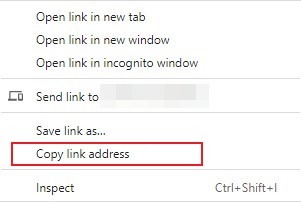
then open a new browser tab, paste the link into the address line, and press Enter.
Supported upgrade versions
-
7.0.0, 7.0.1, 7.0.1u1, 7.0.2, 7.0.2u1, 7.0.3, 7.0.3u1 and 7.4.1, 7.4.2, 7.4.3, 7.4.4, 7.4.4u1, 7.4.4u2, 7.4.5, 7.4.6, 7.4.7, 7.4.8, 7.4.9, 7.4.10, 7.4.11, 7.4.12, 7.4.13, 7.5.0, 7.5.1, 7.5.2, 7.5.3, 7.5.4, 7.5.5, 7.5.6, 7.5.7, 7.6.0, 7.6.1, 7.6.3
-
6.4.6, 6.4.7
Supported Platforms
- 3062, 4062, 4065, 8063, 8064, 8065,10063, 10064, 10065, 12063, 12064, 12065 and all Virtual Appliances
Upgrade Path
- Upgrading from a previous 7.* version is a direct update to version 7.6.5. Check the important notes section for details if you are upgrading from version 7.6.0 or earlier with UEFI boot enabled.
- Upgrading from a version prior to 6.4.3:
- Upgrade from appliance version to 6.4.3 and reboot.
- Upgrade from 6.4.3 to 6.4.6 or 6.4.7 and reboot.
- Upgrade from 6.4.6/6.4.7 to 7.4.7 and reboot.
- Upgrade to 7.5.3 and reboot.
- Upgrading from a 6.x version after 6.4.3:
- Upgrade from appliance version to 6.4.6 or 6.4.7 and reboot.
- Upgrade from 6.4.6/6.4.7 to 7.4.7 and reboot.
- Upgrade to 7.5.5 and reboot.
Important Notes
- The upgrade from 6.4.3 may take longer than normal due to the database upgrade that takes place.
- v7.x will only accelerate with peers running 6.4.3 and later due to changes to the Exinda internal protocols. If you are installing v7.x into an x800 estate, the best approach is to upgrade your core box to 6.4.3 and then install v7 on one or more branch offices. This allows all the existing appliances to accelerate to the core appliance and allows the v7 appliances to accelerate to the core box running 6.4.3.
When upgrading from a UEFI-enabled installation running version 7.6.0 or earlier, execute the following steps to prevent a failed upgrade:
- Ensure you're on the latest previous version 7.6.0-0101
- Upload this script to the Exinda. example: pscp -scp uefi_bootmgr_fix.sh admin@192.168.1.43:/var/home/root/
- SSH to the Exinda - e.g ssh admin@192.168.1.43
- Enter shell and license - en > _shell > enter license
- Make script executable - chmod +x /var/home/root/uefi_bootmgr_fix.sh
- Go to directory where script was uploaded - cd /var/home/root
- Run the script - ./uefi_bootmgr_fix.sh
- Upgrade to the 7.6.5 release via UI as usual
Summary of changes
-
Improved
- Exinda AI Advisor now analyzes the appliance configuration and performance data to provide appliance-specific recommendations.
- AI Wizard: added a Virtual Circuits sidebar with Policy Library mode, application name validation, and policy name conflict detection.
- AI Wizard and AI Advisor sessions are preserved across page reloads.
- AI requests now use the configured web proxy.
-
Fixed
- AI-generated CLI commands are now strictly validated before execution.
- Fixed security vulnerabilities in the web UI diagnostic tools:
- CVE-2026-74235 - directory traversal in file download handling allowing arbitrary file read
- CVE-2026-74236 - directory traversal in file removal handling allowing arbitrary file delete
- CVE-2026-74237 - option injection in the web tools command allowing arbitrary file read
-
GFI thanks Alex Williams of Pellera Technologies for discovering and responsibly disclosing these vulnerabilities
Oleg Krekov
Comments