Overview
Exinda 7.6.4 adds support for new appliance hardware and enhanced security options along with several other bug fixes and improvements. Check the summary of changes section for a more detailed breakdown.
This article provides the files required to download the Exinda Network Orchestrator 7.6.4 and it provides the supporting information about this firmware version as well as the summary of the changes.
-
Release date: July 07, 2026
-
Build ID: 0213
Information
Software Update
You can download the ExOS v7.6.4 firmware using one of the options here:
-
exinda-v7.6.4-0213-x86_64.img (MD5 02055057e224a6e35ba6cdb1b543b44d
Size 768,885,142 bytes) -
exinda-v7.6.4-0213-x86_64.iso (MD5 b272d3d3fc7554748b7bd6cca6432176
Size 938,475,520 bytes) -
exinda-v7.6.4-0213-x86_64.zip (MD5 046151b447b765de9731aab6da57daad
Size 786,069,745 bytes)
Note: If you click on the ExOS v7.6.4 download link and the download does not begin automatically, right-click on the link and select Copy Link Address:
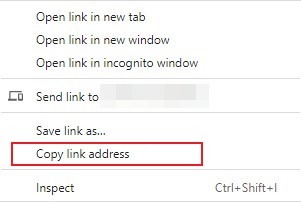
then open a new browser tab, paste the link into the address line, and press Enter.
Supported upgrade versions
-
7.0.0, 7.0.1, 7.0.1u1, 7.0.2, 7.0.2u1, 7.0.3, 7.0.3u1 and 7.4.1, 7.4.2, 7.4.3, 7.4.4, 7.4.4u1, 7.4.4u2, 7.4.5, 7.4.6, 7.4.7, 7.4.8, 7.4.9, 7.4.10, 7.4.11, 7.4.12, 7.4.13, 7.5.0, 7.5.1, 7.5.2, 7.5.3, 7.5.4, 7.5.5, 7.5.6, 7.5.7, 7.6.0, 7.6.1, 7.6.3
-
6.4.6, 6.4.7
Supported Platforms
- 3062, 4062, 4065, 8063, 8064, 8065,10063, 10064, 10065, 12063, 12064, 12065 and all Virtual Appliances
Upgrade Path
- Upgrading from a previous 7.* version is a direct update to version 7.6.4. Check the important notes section for details if you are upgrading from version 7.6.0 or earlier with UEFI boot enabled.
- Upgrading from a version prior to 6.4.3:
- Upgrade from appliance version to 6.4.3 and reboot.
- Upgrade from 6.4.3 to 6.4.6 or 6.4.7 and reboot.
- Upgrade from 6.4.6/6.4.7 to 7.4.7 and reboot.
- Upgrade to 7.5.3 and reboot.
- Upgrading from a 6.x version after 6.4.3:
- Upgrade from appliance version to 6.4.6 or 6.4.7 and reboot.
- Upgrade from 6.4.6/6.4.7 to 7.4.7 and reboot.
- Upgrade to 7.5.5 and reboot.
Important Notes
- The upgrade from 6.4.3 may take longer than normal due to the database upgrade that takes place.
- v7.x will only accelerate with peers running 6.4.3 and later due to changes to the Exinda internal protocols. If you are installing v7.x into an x800 estate, the best approach is to upgrade your core box to 6.4.3 and then install v7 on one or more branch offices. This allows all the existing appliances to accelerate to the core appliance and allows the v7 appliances to accelerate to the core box running 6.4.3.
When upgrading from a UEFI-enabled installation running version 7.6.0 or earlier, execute the following steps to prevent a failed upgrade:
- Ensure you're on the latest previous version 7.6.0-0101
- Upload this script to the Exinda. example: pscp -scp uefi_bootmgr_fix.sh admin@192.168.1.43:/var/home/root/
- SSH to the Exinda - e.g ssh admin@192.168.1.43
- Enter shell and license - _en > shell > enter license
- Make script executable - chmod +x /var/home/root/uefi_bootmgr_fix.sh
- Go to directory where script was uploaded - cd /var/home/root
- Run the script - ./uefi_bootmgr_fix.sh
- Upgrade to the 7.6.4 release via UI as usual
Summary of changes
-
Improved
- Improved performance: Resolved a slowdown introduced by a recent update to the deep packet inspection engine (Ipoque PACE2) by rolling it back to a known-stable release. Affected systems should return to normal throughput.
- Fixed incorrect NIC display in case Exinda has unsupported NIC installed.
- Stability fixes: Improved JSON parsing and clearer error output.
-
Fixed
- Enhanced support of Exinda 10065 and 12065 appliances.
Oleg Krekov
Comments