Overview
This guide will walk you through the steps to locate key Device Credentials for Exinda 10065/12065 appliances.
Solution
📍 Where to Find the Device Credentials
On the front left panel of the Exinda 10065 and 12065, there is a small pull-out slider tag - similar to the service tag card found on Dell servers.
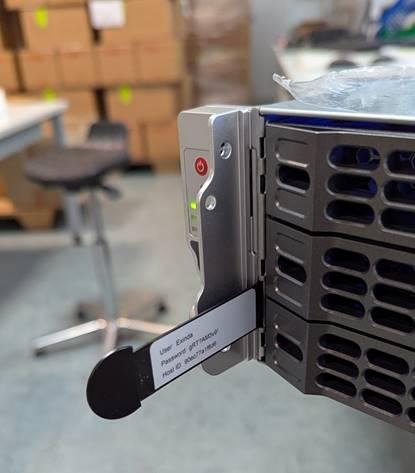
This slider contains a sticker with the following key information:
-
Username
-
Password
-
Host ID
🔍 How to Access It
-
Locate the small slider tab on the front left of the appliance
-
Pull it out gently — it slides out smoothly
-
Read the credentials printed on the sticker
-
Push it back in so it sits flush with the front panel
ℹ️ Note
-
These credentials are pre-configured during production by Apligo (the hardware partner)
Andriy Rybalchenko
Comments